Appendix A: The Notation Reference Card and the Landscape Model
This appendix is meant to be used, not read through. The first part is the reference card of Contour, the notation of this book: the seven dimensions, their scales, the frames, the legend and the thirty-second reading order, on one page, in the exact names that docs/NOTATION.md gives them. Keep it beside a landscape while you read one. The second part lists the six standard views and the file names under which they are rendered. The third part describes the landscape model, the machine-readable file from which every view is drawn, field by field, with the register of the series that already holds each field, the semantics of its timeline, the commands of the renderer and the tests that keep model and picture in step. The fourth part shows one rendered view and quotes, from the committed model, the few lines of YAML behind one of its marks. Chapter 4 teaches the notation; Appendix B shows how to draw each view by pen.
Nothing on the card is the renderer's choice. The renderer, scripts/render_landscape.py, draws what the specification says and nothing else, and every colour on the card comes from docs/chart_palette.json.
The reference card
The thing drawn is an AI use, called a unit: one way in which an organisation puts a model to work, with the people who work with it. The same model used in two ways is two units; one product that drafts and also files is two units. Each unit is drawn as one mark, and every mark carries seven dimensions. Nothing else is encoded.
The seven dimensions
| # | Dimension | The question it answers | Encoding | Scale |
|---|---|---|---|---|
| 1 | Autonomy | What may the AI do without a person approving each action? | Horizontal position (column) | Level 0 Advisory, Level 1 Assisted, Level 2 Supervised, Level 3 Bounded, Level 4 Autonomous |
| 2 | Reversibility | What would it take to undo the action the AI takes or shapes? | Vertical position (row); the hardest to reverse at the top | R1 Reversible at once, R2 Reversible with effort, R3 Hard to reverse, R4 Irreversible |
| 3 | Reach | How many people do the unit's actions touch in a year? | Area of the mark | S under 100, M 100 to 999, L 1,000 to 9,999, XL 10,000 and more |
| 4 | Usage mode | How did the organisation come to use the model? | Fill colour, with the mode's number inside or beside the mark | Mode 0 Ambient AI, Mode 1 Conversational assistants, Mode 2 Embedded workplace assistants, Mode 3 Agentic work tools, Mode 4 Built AI applications, Mode 5 Autonomous production agents |
| 5 | Identity | With whose permissions does the unit act? | Shape | Circle: a person's identity; rounded square: an identity of its own |
| 6 | Control | Does a policy decision point outside the model enforce what the unit may do, and does a named person hold the decision right? | A small diamond on the left edge (policy point) and a small grey seat above the mark (decision tier) | Policy point: enforced (filled), planned (hollow), none (absent). Decision tier: T1 to T4 in the seat; T0, nobody named, seat absent |
| 7 | Evidence | Where does proof that the controls hold come from? | A short baseline under the mark | Automatic (solid), attested (dashed), none (absent) |
The autonomy levels are adopted, by their exact names, from AI Red Team, Chapter 6 (4, Nordqvist, 2026); the usage modes from AI Governance, Chapter 2 (2, Nordqvist, 2026). The reversibility tiers, the reach classes and the decision tiers are this book's own scales.
Columns: the five autonomy levels
The level belongs to a unit in a context and describes the action the unit takes, not the model's capability. A unit that performs more than one kind of action is drawn at the highest level it holds for any action that changes something outside the unit; read-only actions such as enriching an alert, reading telemetry or researching do not set the column, because autonomy over a read changes nothing that would need undoing. V4 shows the levels per action class, read-only ones included.
| Column | The AI | A person |
|---|---|---|
| Level 0 Advisory | suggests | decides and acts |
| Level 1 Assisted | drafts the action | reviews and executes it |
| Level 2 Supervised | executes after explicit approval of each action | approves each action |
| Level 3 Bounded | executes pre-approved, reversible actions within a codified playbook | is informed and can stop it |
| Level 4 Autonomous | selects and executes actions without per-action approval | sets the bounds in advance |
Rows: the four reversibility tiers
| Row | Meaning | Examples |
|---|---|---|
| R4 Irreversible (top) | physical, safety, legal finality, destroyed records or disclosure to the world | a deleted archive, a published personal dataset, a physical actuation, a final administrative decision taken without a person |
| R3 Hard to reverse | a person's outcome, money or disclosed data is affected and reversal takes weeks and a process | a benefit application deprioritised for a month, a premium quoted, a production configuration changed, a dismissal recommended |
| R2 Reversible with effort | undoing takes hours to days and a known procedure | a routed case, a roster, a merged code change, a published answer that can be corrected |
| R1 Reversible at once (bottom) | the person or operator can undo it in minutes and nothing has left the organisation | a draft, a suggested ranking, a quarantined email, a summary |
The top-right cell, Level 4 Autonomous at R4 Irreversible, is the empty corner. The series concluded that Level 4 is never used for irreversible actions (4, Nordqvist, 2026), so a well-governed landscape has nothing there. Every view shades the cell faintly (#FBE9E7), so that anything drawn in it is visible at once.
Size: the four reach classes
Reach is a count of people whose work or whose outcomes the unit's actions touch in a year, never a count of transactions: a unit touching 40,000 applications from 25,000 applicants is XL by people.
| Size | People a year | Radius, relative to S |
|---|---|---|
| S | under 100 | 1 |
| M | 100 to 999 | 1.6 |
| L | 1,000 to 9,999 | 2.4 |
| XL | 10,000 and more | 3.4 |
Colour: the six usage modes
Each mode has one colour, fixed in docs/chart_palette.json and validated for colour-vision deficiency by scripts/validate_palette.py. The mode's number is always written inside or beside the mark, so that no figure depends on colour alone.
| Mode | Colour |
|---|---|
| Mode 0 Ambient AI | #7890B0 |
| Mode 1 Conversational assistants | #3B82F6 |
| Mode 2 Embedded workplace assistants | #40A090 |
| Mode 3 Agentic work tools | #C88000 |
| Mode 4 Built AI applications | #1B3A7A |
| Mode 5 Autonomous production agents | #B2367D |
The neutrals are fixed too: the seat and the dashed baseline are grey (#6B7280), the solid baseline and the diamond are ink (#182033), supplier containers are a warm grey (#A3927F), non-EU containers a darker one (#8C6D4E), and the red of the empty-corner label and the Level 3 rule is #C0392B.
Shape: identity
| Shape | Meaning | Typical units |
|---|---|---|
| Circle | the unit acts with a person's identity and permissions | a conversational or embedded assistant, an agentic work tool run by a developer, a built application that drafts for a named user |
| Rounded square | the unit acts with an identity of its own | a service account, a workload identity, an agent with its own credentials, a vendor feature acting under the vendor's identity |
The shape is the first thing to check at Level 3 and Level 4. A square there is an agent. A circle there is a person's account being used without that person approving each action, the anti-pattern this book calls delegated access without delegation, a case of the collapse into one identity of the AI component and the person on whose behalf it acts, which AI Platform and Security, Chapter 12, names as the most common identity mistake (3, Nordqvist, 2026).
Diamond and seat: control
| Element | State | Drawn as | Meaning |
|---|---|---|---|
| Policy point (diamond, left edge) | enforced | filled diamond | a policy decision point outside the model enforces what the unit may call, read, write or send |
| planned | hollow diamond | one is planned | |
| none | no diamond | there is none | |
| Seat (small grey circle above the mark) | T1 | seat with "1" | the operator or user holds the decision right |
| T2 | seat with "2" | the system owner or architect | |
| T3 | seat with "3" | an executive | |
| T4 | seat with "4" | the board, the management body or an elected body | |
| T0 | no seat | nobody is named |
A Level 3 Bounded mark without a filled diamond is drawn, by rule, with a thin red outline: AI Red Team, Chapter 6, concludes that a Level 3 capability without a policy point is Level 4 with a misleading label (4, Nordqvist, 2026). People appear in the notation only as the neutral grey of the seat, because the book's question about people is who decides, not where they sit in the organisation chart.
Baseline: evidence
| Baseline | Meaning | Examples |
|---|---|---|
| Solid line | automatic: evidence the system produces | logs, test results, evaluation gates, policies as code |
| Dashed line | attested: evidence a person or a supplier declares | a questionnaire answer, a contract clause, a policy document, a signed attestation |
| No line | none |
The three frames
The frames arrange the same marks; they add no dimension.
| Frame | Element | Drawn as | Meaning |
|---|---|---|---|
| Boundary | own boundary | rounded rectangle, solid border | the organisation's premises, tenant or data centre |
| supplier | rounded rectangle, dashed border, labelled by role (model provider, hosting, application, operations), never by brand | a mark inside it is operated for the organisation by that supplier | |
| non-EU jurisdiction | rounded rectangle, dotted border, labelled with the jurisdiction | containers nest: an EU or EEA supplier sits inside the EU and EEA area, a supplier outside it inside the dotted container | |
| model chip | a small chip labelled "model" joined to the mark by a thin line | the unit takes its model from that supplier | |
| Time | trail | a hollow outline of the mark at its earlier position, a thin line in the mark's colour, the filled mark at its later position | the unit moved between the two dates |
| new | a small tick with the word "new" | the unit appeared during the period | |
| retired | the mark drawn hollow with a cross | the unit was retired during the period | |
| date strip | the two dates under the view | no more than two dates in one view; a year is its start and its end | |
| Comparison | two panels | two landscapes side by side at identical scales, sizes and colours, a shared legend between them, a summary strip under each | nothing may be rescaled to fit |
The summary strip counts the units per mode and per level, and the marks with a filled diamond, a seat and a solid baseline.
The legend, in order
Every view carries the same legend in its margin, in this order. It fits in a strip about 50 mm wide at the right of an A4 page or under the view on a landscape slide.
- The five columns, named.
- The four rows, named, R4 at the top.
- The four sizes, nested.
- The six mode colours with their numbers.
- The two shapes.
- The diamond: filled, hollow; absent means none.
- The seat: "T1 to T4"; absent means T0.
- The baseline: solid, dashed; absent means none.
- Where the view uses them, the three container borders and the model chip.
- Where the view uses it, the trail: earlier, trail, later; new; retired.
Reading a landscape in thirty seconds
- Look at the empty corner first. Anything there is the first question to ask.
- Count the squares at Level 3 and above. Those are the agents. Each should have a filled diamond and a seat.
- Find the marks without a seat. Nobody decides about those.
- Find the dashed baselines at R3. Those are the controls whose proof is a promise.
- Look at the colours. Mode 0 marks without a seat are AI nobody chose; Mode 5 marks are AI that acts.
- Then, and only then, read the names.
What is deliberately left out
The notation does not draw model names, versions or vendors; accuracy, benchmark or cost figures; the components, data flows and interfaces of a system; organisation charts and reporting lines; the legal classification of a unit; or any judgement of value. A landscape is a picture of what is, drawn so that the reader can judge.
The six standard views
Each view is defined once, has a fixed file-name pattern, and is used throughout the book without redefinition. Dates are written in ISO form (2027-12-31); <org> is the organisation's short id from its model (nordvik, hansa).
| View | What it shows | File name |
|---|---|---|
| V1 The one-page landscape | Every unit as a mark on the autonomy by reversibility grid, with size, colour, shape, diamond, seat and baseline, on one date. | docs/images/view_<org>_landscape_<date>.png |
| V2 The landscape over time | V1 with trails between two dates, the new marks ticked, the retired marks crossed, and the two dates in a strip under the view. | docs/images/view_<org>_year_<from>_<to>.png |
| V3 The supply and sovereignty view | The same marks placed in boundary containers: the organisation's own boundary, EU and EEA suppliers by role, non-EU jurisdictions, with model chips. | docs/images/view_<org>_supply_<date>.png |
| V4 The decision-rights view | One row per unit, sorted by level and id; a bar from Level 0 Advisory to the unit's ceiling and a thin bar per action class; the diamond at the ceiling, filled where the policy point is enforced and hollow where it is planned; the seat with its tier at the ceiling; the Level 4 column shaded for units at R3 or R4. | docs/images/view_<org>_decisions_<date>.png |
| V5 The evidence view | One row per unit; columns for logs, tests and evaluations, gates and policies as code, attestations, and none; filled cells for automatic evidence, hatched for attested. | docs/images/view_<org>_evidence_<date>.png |
| V6 The comparison view | Two V1 views side by side, at identical scales, with the shared legend and a summary strip under each. | docs/images/view_compare_<orgA>_<orgB>_<date>.png |
Every view is produced as SVG and PNG from a committed model and never from hand-placed coordinates, and every view carries a footer naming the model file it was rendered from and the word "Illustrative" when the model is one of the two fictional organisations. A figure of Nordvik Region or Hansa Mutual that is not produced this way may not appear in the book.
The landscape model
The notation is backed by a machine-readable model: one YAML file per organisation in landscape/models/, validated against landscape/schema/landscape.schema.json. The model records, for each unit, the seven dimensions, the suppliers it depends on, the identifiers of the series' registers that populate it, and a timeline of changes by date. The fields were chosen so that the registers a large organisation already keeps can fill them without a new inventory being built: the AI inventory of AI Governance, Chapter 9, whose identifier the model's registers block calls ai_system_register (2, Nordqvist, 2026); the mandate manifest of The Transformed Security Architect, Chapter 13, which records, per agent and per action, what the AI may do, who decides each action, who answers for it and who can stop it, and which builds on the written mandate of AI Red Team, Chapter 7, and the levels per action of its Chapter 6 (6, Nordqvist, 2026) (4, Nordqvist, 2026); and the delegation register of AI Boss, Chapter 25, which records the degree of delegation per management function with its deciders and reversibility tests (7, Nordqvist, 2026). Chapter 14 describes how an organisation fills a model from these three. The tables below name, for every field, the register that holds it.
The file
| Field | Type or scale | Meaning | Filled from |
|---|---|---|---|
schema_version |
the constant "1.0" |
The version of the schema the file follows. | The file itself |
illustrative |
boolean | True for the two fictional organisations; every figure rendered from an illustrative model is captioned illustrative. | The file itself |
organisation.id |
short id, lower case, 2 to 31 characters | Used in file names (nordvik, hansa). |
The file itself |
organisation.name |
text | The organisation's name, drawn in every title. | The AI inventory's owner record |
organisation.kind |
public-authority or enterprise |
Drawn in the subtitle of every view. | The AI inventory's owner record |
organisation.home_jurisdiction |
EU, EEA or non-EU |
The jurisdiction of the organisation's own boundary in V3. | The AI inventory's owner record |
organisation.headcount |
integer | Staff, for the reader; not drawn. | The AI inventory's owner record |
organisation.people_served |
integer | Residents or customers, for the reader; not drawn. | The AI inventory's owner record |
organisation.jurisdictions |
list of text | The countries or regions the organisation operates in, named in the subtitle of V3. | The AI inventory's owner record |
organisation.profile |
text | Where the canonical facts live (docs/EXAMPLE_ORGANISATIONS.md for the two fictional organisations). |
The file itself |
suppliers[].id |
short id | Referenced from units by suppliers. |
The organisation's supplier register; for a financial entity the nearest example is the register of information treated in AI Governance, Chapter 7 |
suppliers[].role |
model, hosting, application or operations |
The role drawn on the supplier's container in V3; never a brand. | The supplier register |
suppliers[].jurisdiction |
EU, EEA or non-EU |
Decides whether the container sits inside the EU and EEA area or inside a dotted non-EU container. | The supplier register; the model-origin assessment of AI Governance, Chapter 6 |
suppliers[].label |
text | A generic label drawn under the container's title ("European cloud provider"), never a brand. | The supplier register |
suppliers[].location |
text | Country or region of processing, if known; names the dotted container for a non-EU supplier. | The supplier register |
units[] |
list, at least one | The units, one per AI use (next table). | The three registers |
snapshots[].date, snapshots[].label |
ISO date and text | Named dates the chapters refer to ("Start of the year", "End of the year"); the renderer draws V1, V3, V4 and V5 at each, V2 from the first to the last, and V6 at every date two models share. | The file itself |
The unit
Required fields are marked with an asterisk. Every field from mode to action_levels may also appear in a timeline entry, where it overrides the unit's value from that date onwards.
| Field | Type or scale | Meaning | Filled from |
|---|---|---|---|
id * |
two capitals, a hyphen, two to eight capitals or digits (NR-BT) |
The stable identifier drawn beside the mark and used in captions. | The AI inventory (the inventory entry's id, shortened) |
name * |
text | The unit's name, drawn in V4 and V5. | The AI inventory |
description |
text | What the unit does, for the reader; not drawn. | The AI inventory |
since |
ISO date | When the unit entered the landscape; a unit is not drawn before it. | The AI inventory (lifecycle) |
mode * |
0 to 5 | The usage mode: colour and digit of the mark. | The AI inventory; the register of usage modes in AI Governance, Chapter 2, carries a mode for each use |
identity * |
person or own |
Whose permissions the unit acts with: circle or rounded square. | The mandate manifest (an agent's own identity) or the asset inventory of AI Red Team, Chapter 9 (machine identity); the AI inventory for Modes 0 to 2 |
level * |
0 to 4 | The autonomy level: the column. The highest level the unit holds for any action that changes something outside the unit; read-only actions do not set it. | The mandate manifest (level per action) or the delegation profile (degree per management function) |
reversibility * |
R1 to R4 |
The reversibility tier: the row. | The decision that set the level, which AI Red Team, Chapter 6, derives from reversibility and blast radius; the delegation register's reversibility test |
reach * |
S, M, L or XL |
The reach class: the size. | The AI inventory's counts of users and of people whose cases the unit touches; the class is the book's own |
policy_point * |
enforced, planned or none |
The diamond. | The mandate manifest (every tool call passes a policy decision point outside the agents) or the platform's policy record |
decision_tier * |
T0 to T4 |
The seat. | The delegation register (the deciders per management function) or the mandate manifest (who decides each action, who answers) |
decision_holder |
text | The role that holds the decision right ("Head of Benefits Unit (system owner)"); not drawn, kept for the reader and the stop path. | The AI inventory's owner; the mandate manifest's stop holder; the delegation profile's deciders |
evidence * |
automatic, attested or none |
The baseline. | The evidence record behind the inventory (AI Governance, Chapter 11); the mandate manifest's stop path and its tests |
evidence_kinds |
list of logs, tests, gates, attestations |
The columns filled in V5. | The same evidence record |
operated_by * |
self or supplier |
Whether the organisation or a supplier operates the unit. | The AI inventory; the supplier contract |
hosting * |
own-premises, eu-supplier, eea-supplier, non-eu-supplier or unknown |
Which container the mark sits in, in V3. | The AI inventory (hosting) |
suppliers |
list of supplier ids | The suppliers the unit depends on; the container is the hosting supplier, then application, then operations, then model; a model supplier that is not the container is drawn as a chip. | The supplier register |
status |
planned, pilot, active, paused or retired; active when absent |
Lifecycle: a planned unit is not drawn before since; a paused or retired unit is drawn hollow, a retired one with a cross. |
The AI inventory (lifecycle status) |
action_levels |
map of action class to level 0 to 4 | For V4: the autonomy level per class of action when a unit holds more than one ("offer an open shift": 3). | The mandate manifest (level per action) or the delegation profile (degree per management function) |
registers.ai_system_register |
text | The unit's identifier in the AI inventory. | The AI inventory |
registers.decision_records |
list of text | The AI Decision Records that decided the unit's mode, level and controls (AI Platform and Security, Chapter 5). | The architecture repository |
registers.mandate_manifest |
text | The mandate manifest the unit runs under (MND-*). |
The mandate manifest |
registers.delegation_profile |
text | The delegation profile for a unit that performs a management function (DLG-*). |
The delegation register |
registers.fria |
text | The identifier of the unit's fundamental rights impact assessment, where the AI Act requires one. | The AI inventory's compliance record |
timeline[] |
list of dated entries | Changes by date (next section). | The decision records that changed the unit |
notes |
text | Free text for the reader; the one phrase the tests read is "empty corner" (next section). | The file itself |
The schema allows no field that is not listed here, so a typing mistake in a field name is a validation error, not a silently ignored line.
The timeline
A unit's top-level fields are its state at the start of the modelled period. Each entry in timeline has a date, an optional note, and any of the state fields; the entry overrides those fields, and only those, from its date onwards. The renderer, asked for a date, sorts the entries and applies every entry dated on or before that date, in order, so that a later entry overrides an earlier one field by field. Two rules decide whether a unit is drawn at all: a unit whose since is after the date is not drawn, and a unit whose status is planned is not drawn before since. A unit whose status has become paused or retired stays in the picture, drawn hollow, and a retired unit carries a cross, so that a landscape at the end of a year still shows what was switched off during it.
V2 is built from two dates. The renderer computes the state of every unit at the start and at the end, then draws the end state of every unit, a hollow outline and a trail for every unit whose cell changed, a tick and the word "new" for every unit drawn at the end that was not drawn at the start, and a hollow crossed mark for every unit that was retired between the two. The subtitle lists the new, the moved and the retired units by id. No more than two dates are ever drawn in one view; the chapter says what happened between them.
The tests require timeline dates to be ascending, unique within a unit and inside the span of the model's snapshots. A timeline entry that names no field changes nothing.
The renderer
scripts/render_landscape.py draws the views. It validates the model, applies the timeline to the date asked for, places the marks in their cells and saves an SVG and a PNG with identical bytes on every run (a fixed backend, a fixed hash salt, no dates or tool names in the metadata), so that a re-render in CI can be compared byte for byte with the committed file.
| Command | What it does |
|---|---|
python3 scripts/render_landscape.py --all |
Validates every model in landscape/models/ and renders every view the model set implies into docs/images/: V1, V3, V4 and V5 at each snapshot, V2 from the first snapshot to the last, and V6 for every pair of models at every date both share. |
python3 scripts/render_landscape.py --check |
Validates the models, renders everything into a temporary directory and compares the bytes with the committed files; reports every missing or differing file and exits non-zero on any difference. CI runs this. |
python3 scripts/render_landscape.py --list |
Prints the files the model set implies, so that a chapter can reference only views that exist. |
python3 scripts/render_landscape.py --model landscape/models/nordvik_region.yaml --view landscape --at 2027-12-31 |
Renders one view of one model on one date. --view is one of landscape, supply, decisions, evidence, year or compare; --at defaults to the model's first snapshot. |
python3 scripts/render_landscape.py --model landscape/models/nordvik_region.yaml --view year --from 2027-01-01 --to 2027-12-31 |
Renders V2 between two dates; without --from and --to, from the first snapshot to the last. |
python3 scripts/render_landscape.py --model A.yaml --other B.yaml --view compare --at 2027-01-01 |
Renders V6 for two models on one date. |
Three further options exist for other repositories: --models-dir (default landscape/models), --out (default docs/images) and --palette (default docs/chart_palette.json).
The tests
tests/test_landscape_models.py keeps the models, the views and the chapters in step. It checks that:
| Test | What it requires |
|---|---|
test_models_exist |
At least one model in landscape/models/. |
test_model_validates_against_schema |
Every model validates against the schema, with date formats checked. |
test_unit_ids_unique_and_well_formed |
Unit ids are unique within a model and match the pattern (NR-BT, HM-CLM). |
test_every_referenced_supplier_exists |
Every supplier id named by a unit or a timeline entry is declared under suppliers. |
test_timeline_dates_ascending_and_within_snapshots |
Timeline dates are ascending, unique and inside the span of the snapshots. |
test_empty_corner_rule |
On every snapshot and timeline date, no unit stands at Level 4 Autonomous and R4 Irreversible, unless its notes say "empty corner", which is how a model records a deliberate exception for the reader to see. |
test_level_3_without_enforced_policy_point_is_reported |
Every Level 3 Bounded unit without an enforced policy point is reported as a warning; the renderer draws it with the red outline. |
test_implied_files_follow_the_file_name_patterns |
Every file the model set implies matches one of the six patterns above. |
test_every_referenced_view_png_exists_and_is_implied |
Every view_*.png named in any chapter is implied by a model and has been rendered. |
test_render_check_passes |
--check passes: the committed PNGs and SVGs are byte-identical to a fresh render. |
The schema file and the tests are the specification's enforcement; a picture of either organisation that the tests do not accept does not reach the book.
One view, and the model behind one mark
Nordvik Region is a fictional regional public authority; its landscape is illustrative and rendered from landscape/models/nordvik_region.yaml. The view below is V1 at the end of 2027.
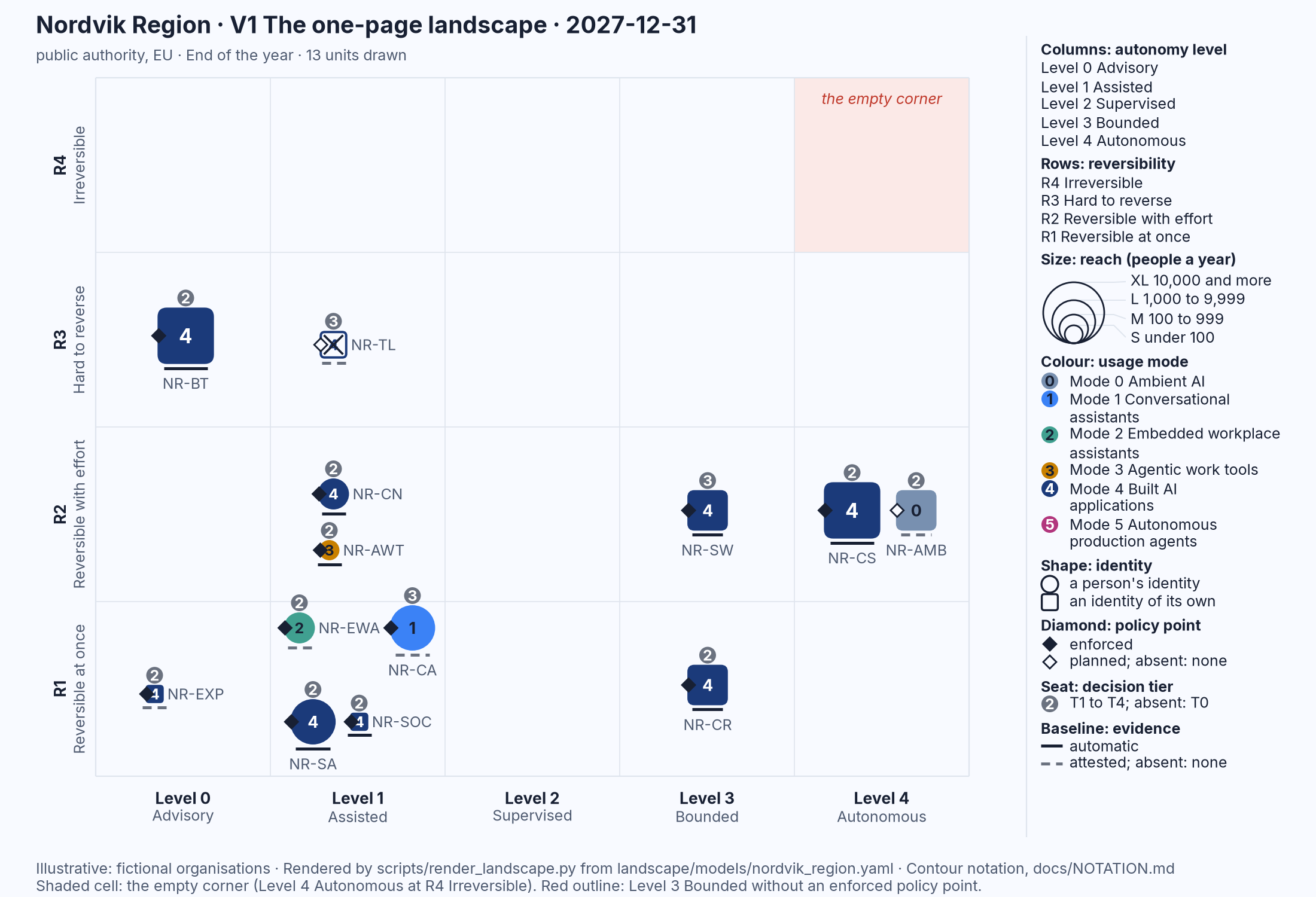
Figure 22.1: Nordvik Region's landscape on 31 December 2027, V1. Illustrative: rendered from landscape/models/nordvik_region.yaml.
Read in the thirty-second order: the empty corner is empty. Four squares stand at Level 3 and above, NR-CR and NR-SW at Level 3 Bounded, NR-CS and NR-AMB at Level 4 Autonomous; three carry a filled diamond and a seat, and NR-AMB, the Mode 0 Ambient AI in licensed software, carries a hollow diamond and a seat marked 2. No mark lacks a seat. One dashed baseline sits at R3, under NR-TL, the recruitment screening pilot, which is drawn hollow with a cross because it was retired on 30 June 2027. The remaining colours are Mode 4 built applications, one Mode 1 assistant, one Mode 2 pilot and one Mode 3 agentic work tool, and there is no Mode 5. Only then the names.
The mark NR-SW, at Level 3 Bounded and R2 Reversible with effort, is the rostering and shift-allocation unit. These are the lines of the model behind it, quoted as committed:
- id: NR-SW
  name: Rostering and shift allocation
  description: Drafts four-week rosters and home-care routes; unit managers approve every roster; one Level 3 Bounded class offers open shifts to staff who opted in. High-risk (Annex III point 4(b)).
  since: "2026-10-01"
  mode: 4
  identity: own
  level: 2
  reversibility: R2
  reach: L
  policy_point: planned
  decision_tier: T3
  decision_holder: HR director
  evidence: attested
  evidence_kinds: [attestations]
  operated_by: supplier
  hosting: eu-supplier
  suppliers: [shiftwise]
  status: pilot
  registers: {decision_records: [AIDR-0602, AIDR-0603], delegation_profile: DLG-NR-ROS-01, fria: FRIA-2026-007}
  action_levels: {"draft a roster": 2, "offer an open shift": 3, "flag a rest-rule breach": 1}
  timeline:
    - date: "2027-01-20"
      policy_point: enforced
      status: active
      note: Delegation profile DLG-NR-ROS-01 v1.0.0 agreed with the unions; routes live in Strandvik home care.
    - date: "2027-03-11"
      level: 3
      evidence: automatic
      evidence_kinds: [logs, gates, attestations]
      note: Travel-time and rest constraints enforced as hard constraints; open-shift offers at Level 3 Bounded within the profile.
The supplier it names is declared once at the top of the file, by role and jurisdiction and never by brand:
- {id: shiftwise, role: application, jurisdiction: EU, label: "Rostering and shift-allocation provider (tender NR-2025-089)", location: EU}
On 1 January 2027 the top-level fields apply: a Mode 4 square of size L at Level 2 Supervised and R2, a hollow diamond, a seat marked 3, a dashed baseline, and, because its status is pilot, a filled mark. The entry of 20 January fills the diamond and makes the unit active. The entry of 11 March moves the mark one column to the right, to Level 3 Bounded, and turns the baseline solid. By 31 December, the date of Figure 22.1, both entries have been applied, which is the mark the figure shows: a Mode 4 square, L, at Level 3 Bounded and R2 Reversible with effort, with a filled diamond, a seat marked 3 and a solid baseline. In V2 for 2027 the same unit appears with a hollow outline in the Level 2 cell, a trail, and the filled mark in the Level 3 cell; in V4 it has three thin bars under its row, one per action class, the longest reaching Level 3; in V5 its row has filled cells for logs and gates and a hatched cell for attestations. Every one of those pictures is the same thirty-one lines, read on a different date.
Sources
- Nordqvist, G. (2026). AI Governance: Governing Artificial Intelligence in European Enterprises and Public Authorities. (2, Nordqvist, 2026)
- Nordqvist, G. (2026). AI Platform and Security: Building and Securing AI Platforms in European Enterprises and Public Authorities. (3, Nordqvist, 2026)
- Nordqvist, G. (2026). AI Red Team: AI as an Active Part of Cyber Defence in European Enterprises and Public Authorities. (4, Nordqvist, 2026)
- Nordqvist, G. (2026). The Transformed Security Architect: Role, Craft and Career in the Age of AI in European Enterprises and Public Authorities. (6, Nordqvist, 2026)
- Nordqvist, G. (2026). AI Boss: When Artificial Intelligence Manages People in European Enterprises and Public Authorities. (7, Nordqvist, 2026)